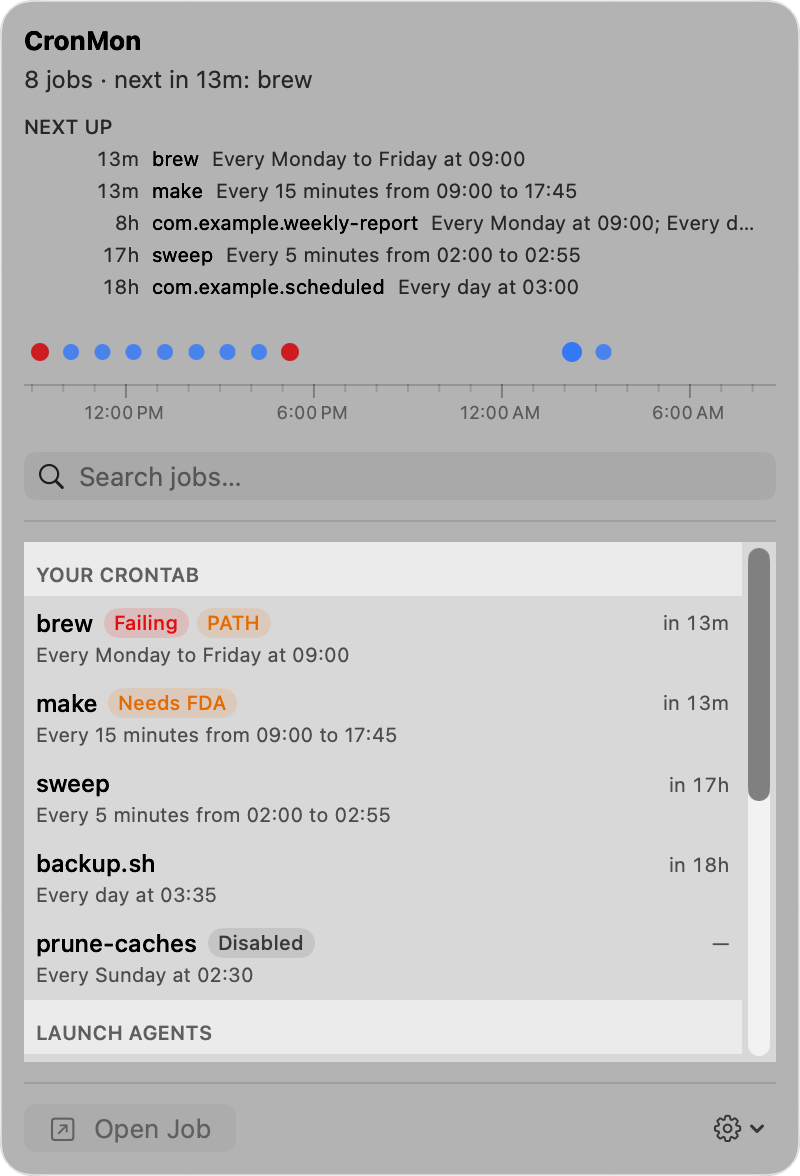
CronMon
crontab is not running on macOS
1. Is the line actually installed?
crontab -lIf that prints crontab: no crontab for you, nothing was saved. The usual cause is an editor that exited without writing, or a syntax error: crontab -e refuses to install a bad file and says errors in crontab file, can't install. A crontab also needs a newline at the end of the last line; some editors do not add one.
2. Is cron running?
pgrep -l cronNo output means no cron process. On macOS that is normal when nobody has a crontab: cron is started on demand by launchd through com.vix.cron, and it is not kept running when there is nothing to run. Install a crontab and cron appears within a minute or so. If crontab -l shows lines but pgrep cron stays empty for several minutes, something has disabled the job:
sudo launchctl print system/com.vix.cron2b. Is your account allowed to use cron?
Two files decide that, and a managed Mac may have either:
cat /usr/lib/cron/cron.allow 2>/dev/null
cat /usr/lib/cron/cron.deny 2>/dev/null
If cron.allow exists, only the accounts named in it may install a crontab; otherwise anyone not named in cron.deny may. When you are shut out, crontab -e says you are not authorized to use cron rather than failing quietly, so this one announces itself — but it is worth a look on a work Mac before blaming the schedule.
3. The PATH inside a cron job is not your PATH
A cron job runs with PATH=/usr/bin:/bin unless the crontab sets one. Not your shell's PATH, and specifically not /opt/homebrew/bin or /usr/local/bin, where Homebrew puts everything. So node, python3 from Homebrew, rsync from Homebrew, gh, docker and friends are simply not found.
Two fixes. Write the command out in full:
0 4 * * * /opt/homebrew/bin/rsync -a ~/src/ /Volumes/Backup/src/Or set a PATH at the top of the crontab, above the jobs:
PATH=/opt/homebrew/bin:/usr/local/bin:/usr/bin:/binThe same applies to anything else your shell profile sets. Cron does not read .zshrc, .zprofile or .bash_profile, so environment variables your script relies on have to be set in the crontab or inside the script.
4. Does the job touch a protected folder?
If the command reads or writes ~/Desktop, ~/Documents, ~/Downloads, iCloud Drive, or a volume under /Volumes, macOS blocks it until cron itself has Full Disk Access, and the job fails with Operation not permitted. Add /usr/sbin/cron in System Settings › Privacy & Security › Full Disk Access. The full steps are here.
5. Read what the job printed
Cron mails a job's output to your local mailbox. Nothing on a Mac shows it to you, so a job that runs and fails every night looks exactly like a job that never runs:
cat /var/mail/$USERThat file is usually where the answer has been sitting all along. More about cron output. Better still, redirect the output somewhere you will look:
0 4 * * * /path/to/script.sh >> /tmp/script.log 2>&1What will not help
Searching the unified log. Cron writes no entries to it at any level, so log show --predicate 'process == "cron"' comes back empty whether the job ran or not. The mailbox and your own redirect are the only records of a cron run on macOS.
Prove it with a job that cannot fail
Add a line that runs every minute and writes a timestamp, wait two minutes, then look:
* * * * * /bin/date >> /tmp/cron-test.logIf /tmp/cron-test.log fills up, cron works and the problem is in your job: PATH, permissions, or the script itself. If it stays empty, the problem is cron, and step 2 is where to look.
Or see it at a glance
CronMon lists every cron job and every scheduled launchd agent on your Mac with its next run, and checks each one for the traps above: a command that is not on cron's PATH, with the directory it is actually in; an executable that is not there; a folder that needs Full Disk Access; output going to mail unread. The header tells you whether cron is running, and why not when it is not.