 CronMon
macOS 14+ · Menu bar app
What runs on this Mac, and when?
Every cron job and every scheduled launchd agent in one list, with the next run written in plain English, drawn on a timeline, and a reason when a job never fires.
macOS 14 or later. 14-day unrestricted trial. No account. One license, three Macs, a year of updates.
$ brew tap suresk/tap
$ brew install --cask suresk/tap/cronmon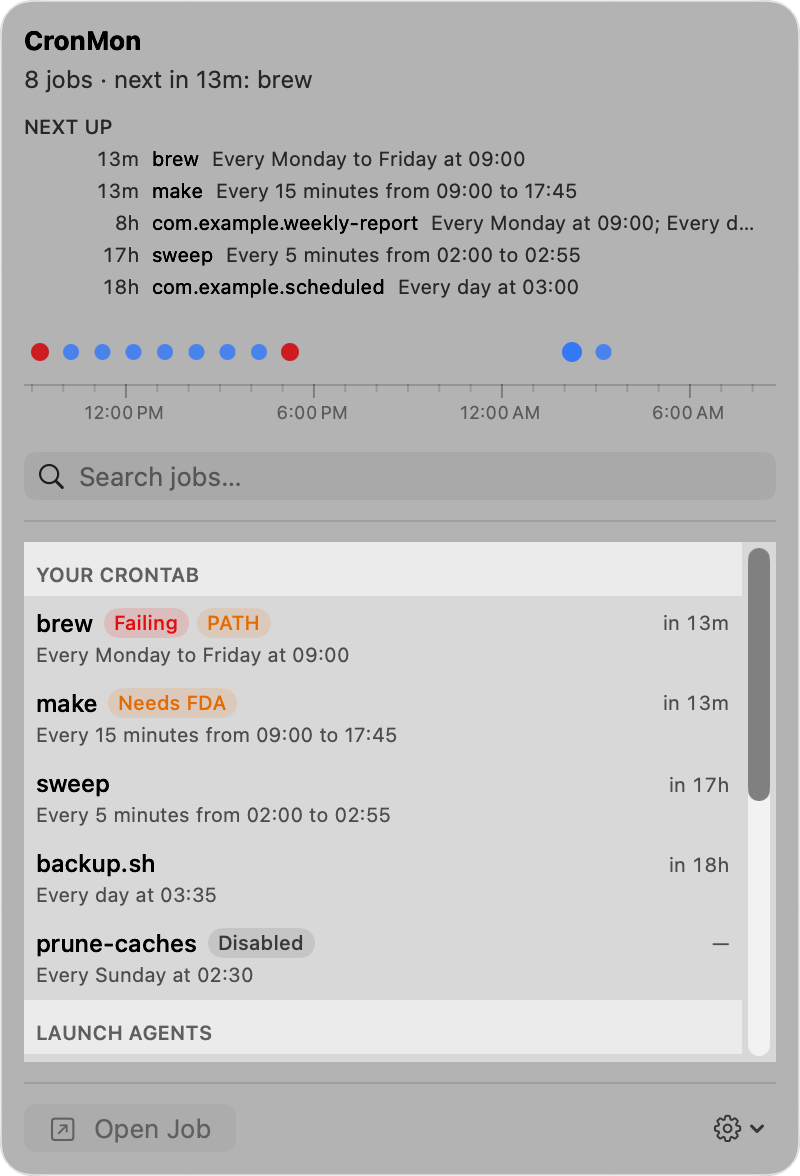
Both schedulers on one screen: your crontab, and the launch agents Homebrew, Docker, your updaters and you installed.
Where launchd's run count and last exit code come from. No password, no background daemon, no root.
CronMon scans this Mac when you open it, when a launch agent or daemon changes on disk, and when you pick Refresh. It never polls. A cron run CronMon sees while it is open updates that job's row on its own, without another scan.
The schedule
The next 24 hours, on one strip
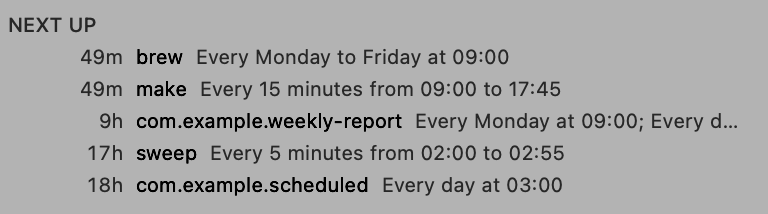
30 4 * * 1-5 becomes "Every Monday to Friday at 04:30". A StartCalendarInterval with three of its five keys missing becomes "Every day at 03:35". Next up lists the five closest runs and how long until each; the strip below puts a dot on every run in the window, over an axis marked in hours.
Look ahead 6 hours, 24 hours, or 7 days. Search by name or command, move with the arrow keys, press Return to open a job. Copy Summary puts the whole list on the clipboard as plain text.

History, honestly
What actually ran
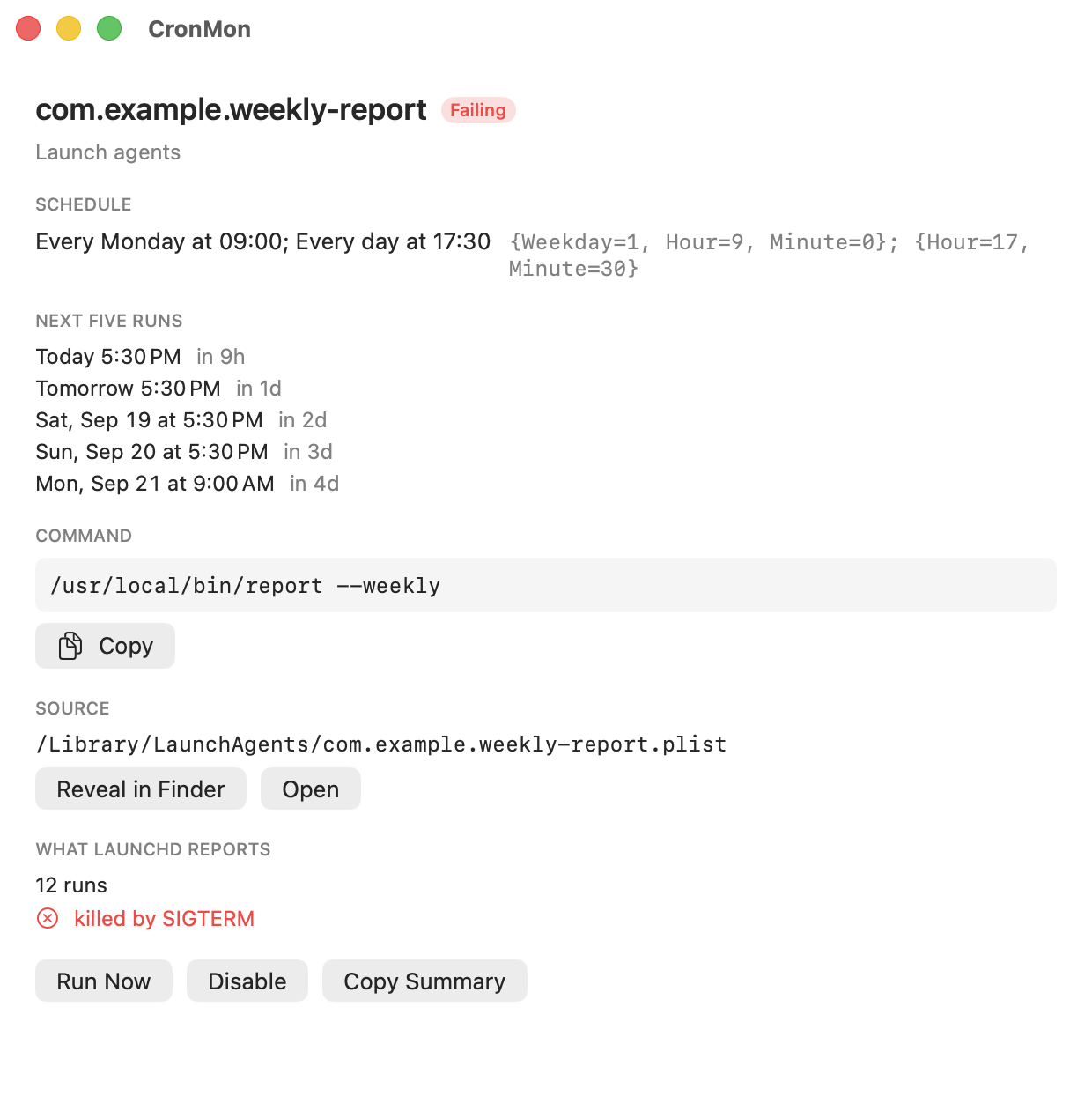
launchd tells us runs and exit codes; for cron we watch the process while CronMon runs. So a launch agent shows the run count, last start and last exit code that launchd itself recorded, whether or not CronMon was open. A cron job shows the runs CronMon saw, dated from when it started watching, and labeled as such.
There is nothing better to read: cron writes no entries to the unified log at any level. What CronMon can add is the job's last output, taken from the mailbox cron delivers it to.
The diagnosis
Why the job did not run
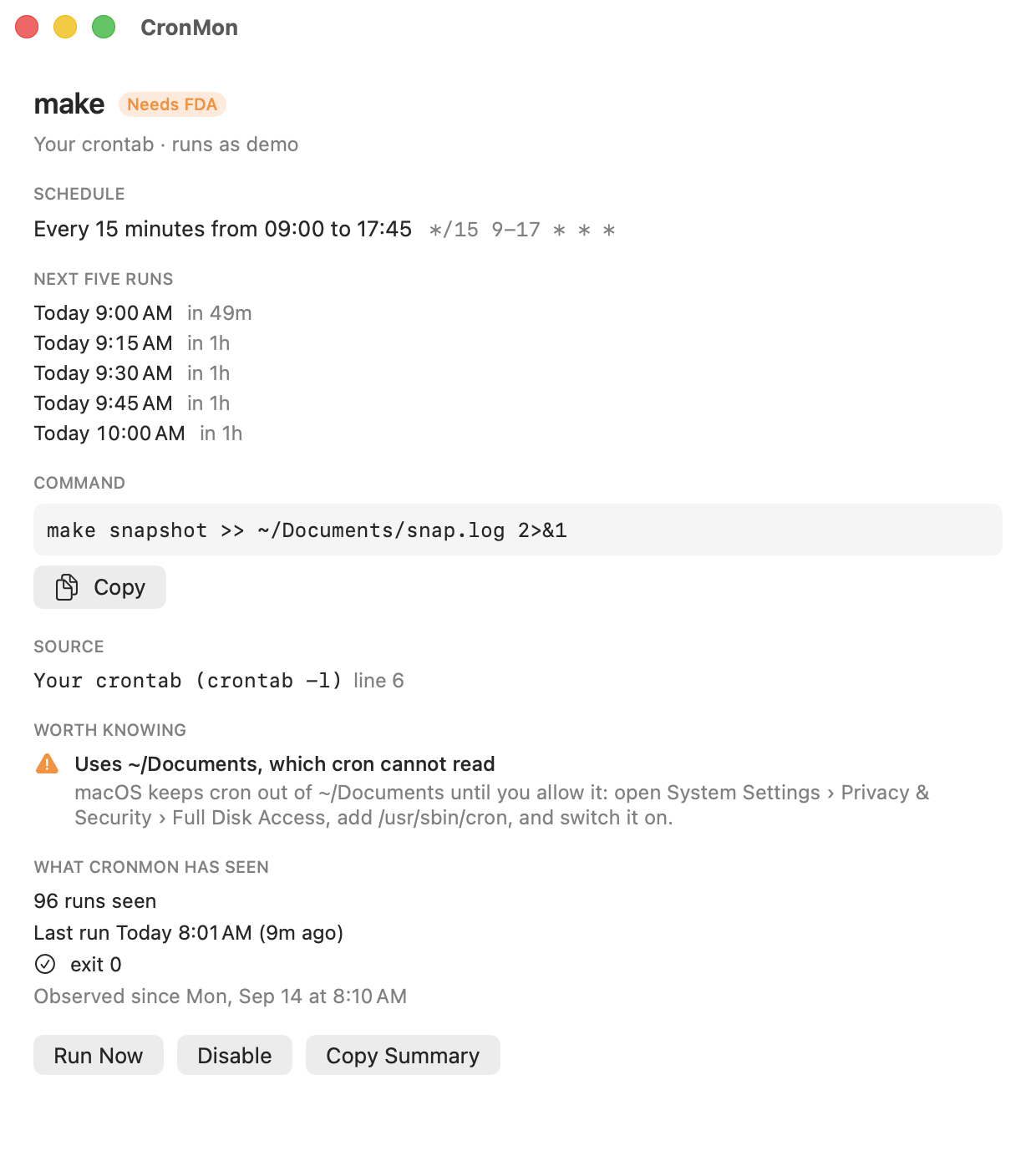
Every job is checked against the things that quietly break scheduled work on a Mac, and each finding carries its fix in the same sentence: a command that is not on cron's PATH, with the directory it is actually in; an executable that is not there at all; a job that touches Desktop, Documents or Downloads before cron has Full Disk Access; output being mailed where nobody will read it; a schedule that matches no date in the next five years; a StartInterval too short for launchd to honor.
Run Now runs a cron job with the environment cron would have given it and shows you what it printed. Disable comments the line out, Enable puts it back, and both write a backup of your crontab first.
The editor
Add a job without learning cron
Add Job… sits in the Your crontab header and in the gear menu; Edit… and Delete… are in the detail view for your own crontab lines. Pick a shape — every N minutes, every N hours, daily, weekly, monthly, at reboot, or custom — and the five fields write themselves. The raw expression stays on screen and stays editable: type in it and the controls follow, move the controls and the expression follows, so you can learn cron by watching it rather than by reading a manual page.
Under it, the sentence and the next five runs, before you save rather than a day later. A comment goes in as a # line above the job, an Enabled toggle writes it commented out, and the warnings you get in the list — the PATH, Full Disk Access, output going to mail, an unescaped %, a schedule that never fires — appear while you type. Every save copies the whole crontab to the backup folder first, then reads it back to check; every line you did not touch comes back byte for byte. Crontab Settings… edits the MAILTO and PATH lines at the top of the file.

Why cron jobs fail on macOS
The PATH is not yours
A cron job runs with PATH=/usr/bin:/bin. Not your shell's PATH, not /opt/homebrew/bin, not /usr/local/bin. The line that works when you paste it into Terminal fails at 4am with "command not found", and the message goes somewhere you never look.
Full Disk Access
macOS keeps cron out of Desktop, Documents, Downloads and removable volumes until you allow it: System Settings › Privacy & Security › Full Disk Access, add /usr/sbin/cron. Until then a backup script reading ~/Documents gets "Operation not permitted" every night.
Output goes to mail
Anything a cron job prints is mailed to the local mailbox at /var/mail/<user>. No Mail.app account reads it, no notification fires, and nothing in the unified log records the run either. The job looks like it never happened.
Pricing
CronMon
$19.99 one-time
- cron and launchd on one timeline, plain-English schedules, diagnostics
- Add, edit and delete your own cron jobs, with a backup before every write
- Run now, enable and disable, Copy Summary
- Three Macs per license, deactivate yourself
- Twelve months of updates included; $9/year to keep them coming
- 14-day refund, no questions
Or get all nine Mac developer tools for $49.99 with the DevTools bundle.
Checkout is handled by Polar, our merchant of record. Your key arrives by email.
Try it first
14 days, everything unlocked, no account, no sign-up. When the trial ends every job, schedule, diagnosis and history stays visible; running a job now, switching one on or off, and adding, editing or deleting a crontab line need a license.
DownloadQuestions
I can already do this with crontab -l and launchctl list. Why pay?
Those two commands are genuinely most of the answer, and if they are enough for you, keep them. What they do not give you: crontab -l prints five-field expressions, not the times they mean, and launchctl list prints every loaded job whether it is scheduled or not, so finding the scheduled ones means opening property lists by hand. Neither puts the two schedulers in one order by when they next run. CronMon adds four things on top: next runs for both, in English and on a timeline; the history that exists — launchd's run count and last exit code, and the cron runs CronMon watched; a check of each job for the PATH, Full Disk Access and mail-output traps, with the fix; and an editor that writes the line for you — add a job, change one, switch it off, delete it — with a backup of the crontab before every write, instead of you getting five fields right in vi. $19.99 once, and a 14-day trial to find out.
cron or launchd — which should I use?
launchd, for anything new. It is what macOS actually schedules with, it runs jobs that were missed while the Mac slept, and it records run counts and exit codes you can read back. cron still works and is far quicker to write, which is why most Macs have both. CronMon shows them together because the answer to "what runs at 4am" is usually spread across the two. There is a guide comparing them.
Does it need root?
No. CronMon asks for no password and installs nothing privileged: your crontab, the launchd property lists it can read, and launchctl print are all available to you as a normal user. Root's crontab and the system daemons are the part a normal user cannot reach, and reaching them needs a privileged helper — that is what 1.1 adds; until then those jobs are shown read-only or not at all. The one prompt you will see is macOS asking whether CronMon may administer your computer, the first time CronMon writes your crontab: that is the standard prompt for /usr/bin/crontab, and the help page explains it.
Why not the App Store?
The sandbox forbids what CronMon does: read your crontab through /usr/bin/crontab, read launchd property lists across the system, and run launchctl. Direct download, notarized by Apple, is the only way this app can exist. Homebrew works too.
Does it edit my crontab?
Only when you ask it to: Disable and Enable, and the editor's Add Job, Save and Delete. Each one changes only the lines it is about — Disable puts #CRONMON-DISABLED in front of a line, Enable takes that marker off, the editor rewrites the one line you opened and the comment above it. Everything else in the file, your other comments and environment lines included, comes back byte for byte. A copy of the whole crontab is written to ~/Library/Application Support/CronMon/crontab-backups/ before every change, and the result is read back and checked. A crontab containing bytes that are not text is shown but never rewritten — CronMon tells you to edit that one with crontab -e.
Can it write cron expressions for me, or convert cron to launchd?
It writes them, as of 0.2.0: pick a shape and a time and CronMon writes the five fields, or type the expression and watch the controls follow. It still does not convert between the two schedulers, and it does not create launchd property lists — launchd jobs are read-only. Both are on the list.
Why does a cron job show fewer runs than it has had?
Because nothing on macOS records them. launchd keeps a run count and the last exit code for its own jobs; cron keeps nothing and writes no entries to the unified log. CronMon watches the cron process while CronMon itself is running and reports only what it saw, dated from when it started watching. Turn on Launch CronMon at login and it sees the runs that happen before you open it.
Does it phone home?
Two calls: license validation, and a daily update check that sends the app version and license state, which we count per day. No tracking: no identifiers, no usage events, no crash reports, no account. Your crontab and your launchd property lists are read on your Mac and go nowhere. See Privacy.
Can I use one license on my work and home Macs?
Yes. Three activations per license; free one from the customer portal whenever you need the seat back.